Discount Strategy enables sellers to define discount rules based on customer,
product, or weight. These rules support consistent pricing during quote processing
and reduce the need for manual price adjustments.
Overview
GMEX DSA supports three discount categories: Customer, Product, and Weight.
Each category addresses a different pricing requirement and can be configured
according to the seller's business needs.
Discount rules define a percentage and the conditions under which it may be
applied. The system evaluates eligible rules during quote processing. Rule
status and the applicable discount priority determine whether a configured
discount is used.
Discount Types
Each discount category applies to a different business condition. The appropriate
category depends on the seller's pricing policy.
Customer10%
Customer-Based Discount
A percentage for one customer. It applies to eligible quotes under that customer's pricing terms.
Customer NameDiscountStatus
A seller offers 10% to a customer with negotiated pricing.
Product5%
Product-Based Discount
A percentage for one product, so eligible quotes use that product's price without a manual change.
Product ShapeDiscountStatus
A seller offers 5% on one product and keeps other products at their own price.
WeightLBS
Weight-Based Discount
A percentage for a weight range. The quote item's weight picks the matching range.
Min WeightMax WeightDiscountStatus
10–50 LBS and 51–100 LBS can each have their own percentage.
Discount Rule Configuration
Discount rules are maintained separately for each category. The configuration
fields determine the target customer, product, or weight range and the
corresponding discount percentage.
Field
Description
Applicable Categories
Customer Name
Identifies the customer associated with the discount rule.
Customer
Product Name
Identifies the product associated with the discount rule.
Product
Min Weight
Defines the minimum weight for the configured range.
Weight
Max Weight
Defines the maximum weight for the configured range.
Weight
Discount
Specifies the discount percentage associated with the rule.
Customer, Product, Weight
Status
Determines whether the discount rule is active or inactive.
Customer, Product, Weight
Customer Name and Product Name are required for their respective discount
categories. Weight-based rules require minimum and maximum weight values.
Weight values must use the unit represented by the application: LBS.
Reference
Rule Management and Status
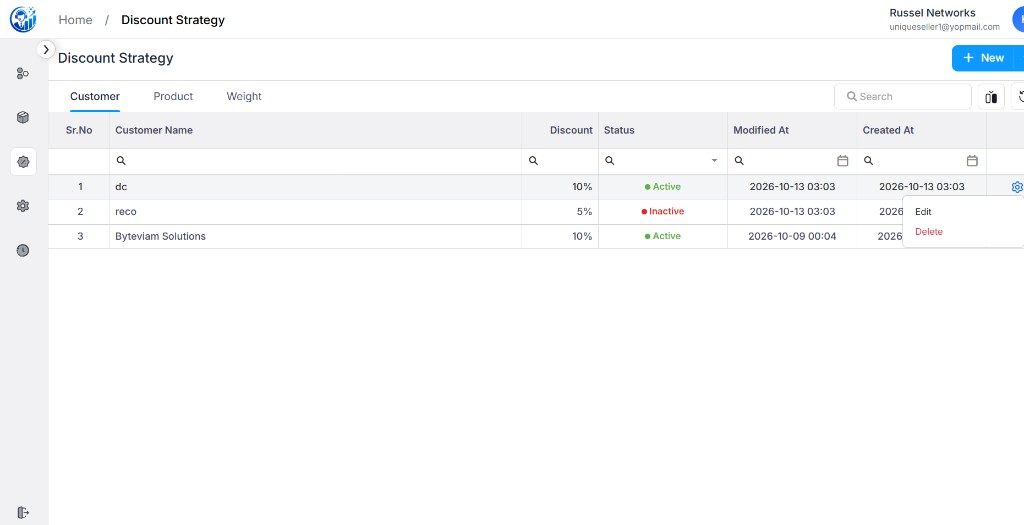
The Discount Strategy page has a separate list for Customer, Product, and Weight.
After a rule is created, open its row menu to edit or delete it.
Edit: Updates a created customer, product, or weight discount.
Delete: Removes a created customer, product, or weight discount from the list.
Active: The rule is enabled and may be applied when the
applicable conditions are met.
Inactive: The rule remains saved but is not applied.
Search: Helps locate a specific rule in the selected category.
The list shows Sr.No, the customer, product, or weight name, Discount, Status,
Modified At, and Created At.
Example screen
Customer list, with Edit and Delete on a saved rule
The same row menu is available on the Product and Weight lists.
Reference
Customer Discount Configuration
Customer discount configuration associates a percentage with a selected
customer. The rule's status determines whether it is eligible for use
during quote processing.
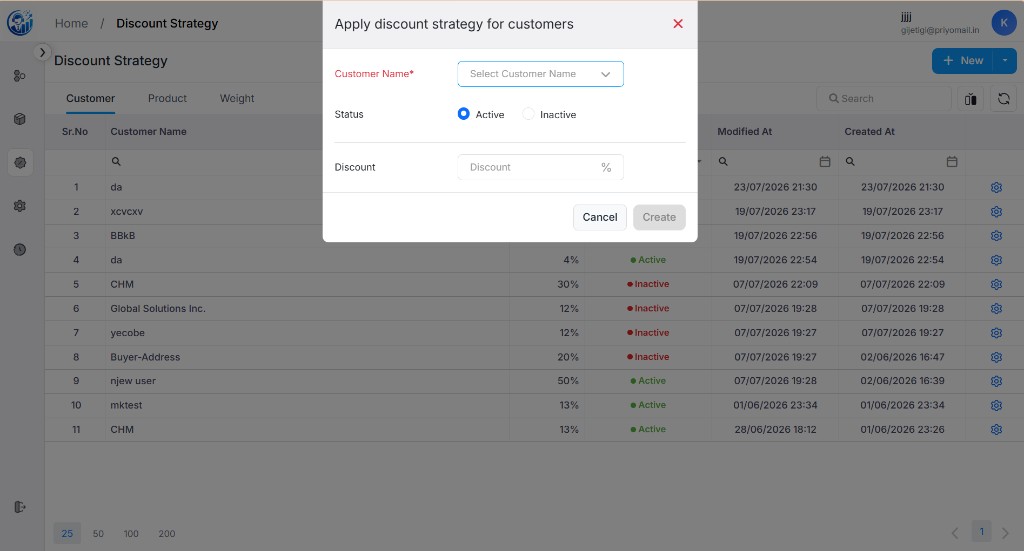
The configuration form includes Customer Name, Status, and Discount.
Customer selection is required. The list view provides access to saved
rules and their management actions.
Interface Reference
Customer discount configuration
Reference image of the customer discount form. Displayed customer names
and discount values are illustrative.
Reference
Product Discount Configuration
Product discount configuration associates a percentage with a selected
product. The rule can be considered during quote processing when the
configured product and other applicable conditions match.
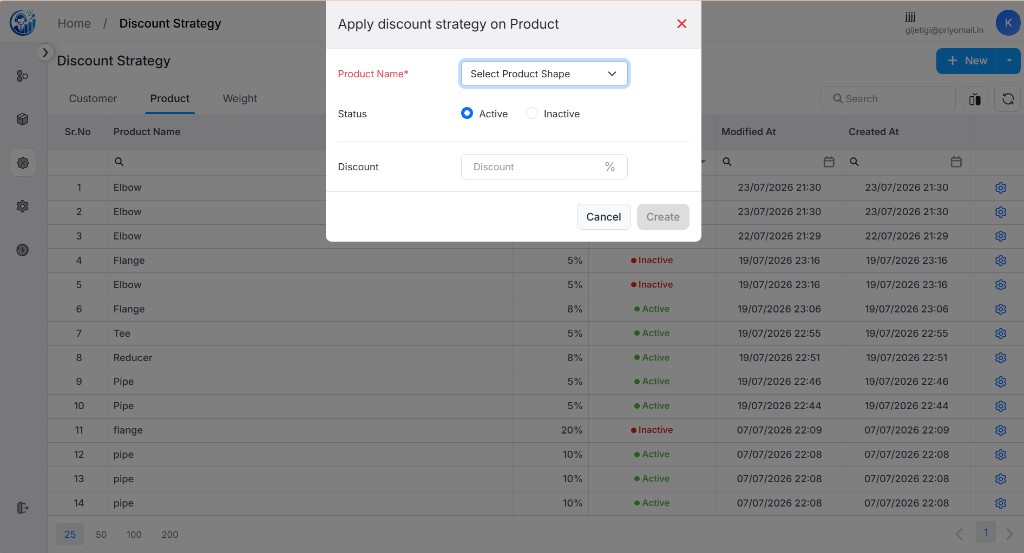
The configuration form includes Product Name, Status, and Discount.
The product selection list is labeled Select Product Shape.
Interface Reference
Product discount configuration
Reference image of the product discount form and the existing product
discount list. Displayed products and values are illustrative.
Reference
Weight Discount Configuration
Weight discount configuration defines a discount percentage for a specified
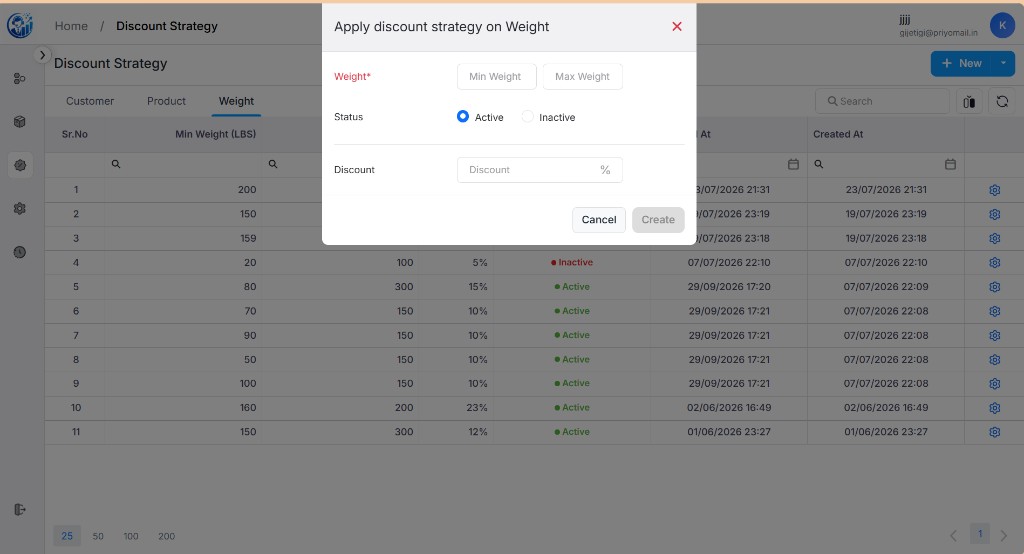
minimum and maximum weight. The weight list uses pounds (LBS) as its unit.
Weight-based discounts are not applied to quote items that do not contain
weight information. The configured weight range and discount percentage
determine the intended scope of each rule.
Interface Reference
Weight discount configuration
Reference image of the weight discount form and the existing weight discount
list. Displayed weight ranges and percentages are illustrative.
Discount Application in Quote Processing
During quote processing, the system evaluates discount rules against the
relevant customer, product, and weight information.
Only active rules that satisfy the applicable matching conditions are
eligible for application.
When multiple rules match, the configured priority logic determines which
discount is used.
Inactive rules are excluded from discount application.
Quote items without weight information are not eligible for weight-based
discounts.
The applied discount is reflected in the quote item's breakdown. This allows
users to review the resulting pricing calculation without manually entering
the discounted price for these cases.
Illustrative Discount Examples
The following examples demonstrate how different discount categories may
support seller pricing policies. The values are illustrative and do not
represent actual account data or guaranteed discount outcomes.
Category
Example Rule
Purpose
Customer
Customer A — 5%
Support customer-specific pricing.
Product
Product X — 10%
Support product-specific pricing.
Weight
100–500 LBS — 5%
Support pricing based on an item's weight range.
The actual discount depends on the saved rule, its status, the matching
conditions, and the system's configured discount priority.
Operational Considerations
Ensure that configured discount percentages reflect the seller's intended
pricing policy.
Review rule statuses to ensure that inactive rules are not unintentionally
excluded from quote calculations.
Verify weight ranges and the LBS unit when configuring weight-based rules.
Review quote item breakdowns to understand which discount was applied.